Open Kick is a drum synthesizer that matches a sample and maps every setting it can. Start from a kick you like and shape it to a song, or build one from scratch.
Sample text for a second introductory paragraph.
The following sections are described below:
- Sample Controls
- Main Controls
- Parameter Table
- Randomization Controls
- Presets and Favorites
- Residual
- Menu Controls
- Other Controls
- DAW Integration
Sample Controls
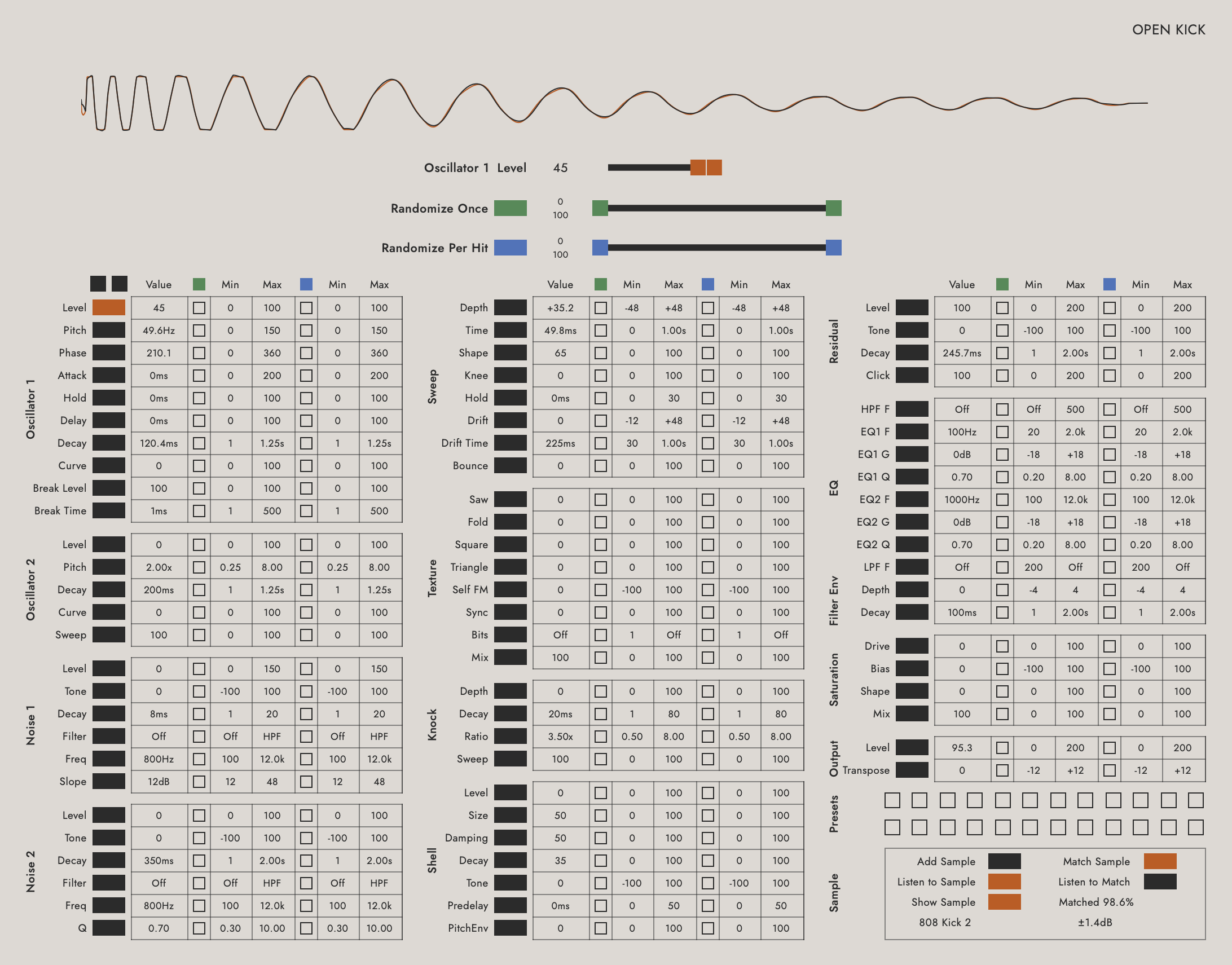
Sample text introducing this section. The waveform at the top of the plugin shows the loaded sample in grey and the synth in the active color.
Add Sample: Sample text. A sample can also be dropped anywhere in the plugin window.
Match Sample: Sample text.
Listen to Sample: Sample text.
Listen to Match: Sample text.
Show Sample: Sample text.
Matched %: Sample text.
Sample text for a second line under a definition.
Main Controls
Sample text introducing the slider block. The active parameter is shown with one value slider and two range sliders.
Value: Sample text.
Randomize Once Range: Sample text.
Randomize Per Hit Range: Sample text.
Previous/Next Parameter: Sample text.
Readouts: Sample text. Drag a readout to change its value.
Parameter Table
Sample text introducing the table. Each row is one parameter with its enable buttons, value, and ranges. Touching any cell selects its row.
- Oscillator 1: Sample text.
- Oscillator 2: Sample text.
- Noise 1: Sample text.
- Noise 2: Sample text.
- Sweep: Sample text.
- Texture: Sample text.
- Knock: Sample text.
- Shell: Sample text.
- Residual: Sample text.
- EQ: Sample text.
- Filter Env: Sample text.
- Saturation: Sample text.
- Output: Sample text.
Section Names: Sample text. Clicking a section name solos that part of the sound.
Randomization Controls
Randomize Once: Sample text.
Randomize Per Hit: Sample text.
Randomization Enable: Sample text.
Note: Shift-clicking an enable button toggles the whole section.
Skew: Sample text.
Snap to Min / Snap to Max: Sample text.
Presets and Favorites
Presets: Sample text. 24 slots in two banks of 12.
Preset Manager: Sample text. Move, copy, and clear presets between files.
Favorites: Sample text. Right-click a select button to assign a parameter to a favorites slot.
Compact View: Sample text. The compact view shows the waveform, slider block, presets, and favorites.
- Previous/Next Preset: Sample text.
- Previous/Next Favorite: Sample text.
Residual
Sample text introducing the Residual section.
Level: Sample text.
Tone: Sample text.
Decay: Sample text.
Click: Sample text.
Save Residual / Load Residual: Sample text.
Menu Controls
The Open Kick button allows the user to do the following:
- Reset: Sample text.
- Open File: Sample text.
- Save File: Sample text.
- Preferences: Sample text.
- Kick Settings: Sample text.
- Signal Chain: Sample text.
- Velocity: Sample text.
- Choke: Sample text.
- Key Track: Sample text.
- Light/Dark Mode: Sample text.
- Remove Sample but Keep Match: Sample text.
- Save Residual / Load Residual: Sample text.
- Manage Presets: Sample text.
- Deactivate License: Deactivates the current license for use on another device.
Other Controls
There are a number of hidden clicking options that may make the plugin easier to use.
Double-clicking a value returns it to the matched value while a match is loaded, or to the default otherwise.
Here is a list of other shift-click actions:
| Shift-Click | Action |
|---|---|
| "Open Kick" text | Change Light/Dark View mode |
| Any empty space | Change Full/Compact View mode |
| Randomization Enable buttons | Enable or disable the whole section |
| Slider drag | Fine mode |
| Previous/Next buttons (compact view) | Step favorites instead of presets |
| Sample text | Sample text |
DAW Integration
Open Kick is an instrument plugin. Load it on an instrument track and play it from a MIDI controller or a MIDI clip. Sample text for anything DAW-specific.
Ableton Live
Sample text.
- Create a MIDI track.
- Load Open Kick on the track.
- Sample text for a third step.
Note: Sample text for a note under a step.
Logic Pro
Sample text.
- Create a Software Instrument track.
- Load Open Kick as the instrument.
MIDI Mapping
The following parameters are enabled for automation/MIDI Mapping:
- Sample Parameter 1
- Sample Parameter 2
- Sample Parameter 3
- Sample Parameter 4
- Sample Parameter 5
- Sample Parameter 6
- Sample Parameter 7
- Sample Parameter 8
- Sample Parameter 9
- Sample Parameter 10
- Sample Parameter 11
- Sample Parameter 12
In Ableton Live, this is done by clicking the Unfold Device Parameters triangle as shown here.